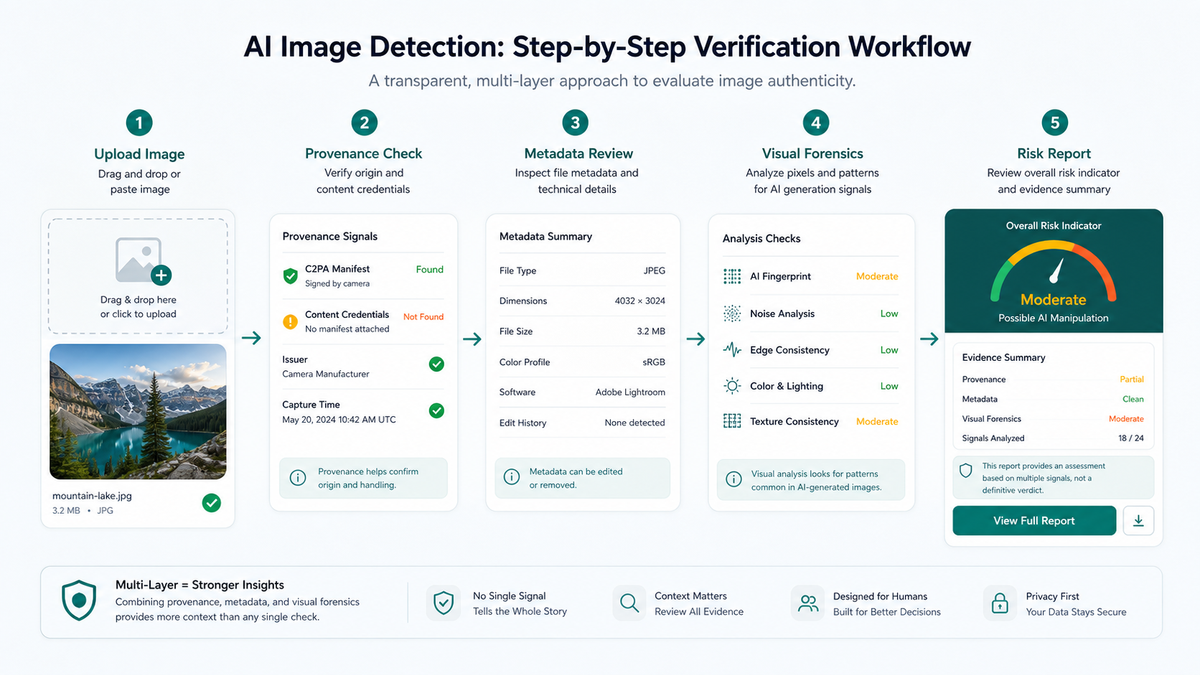
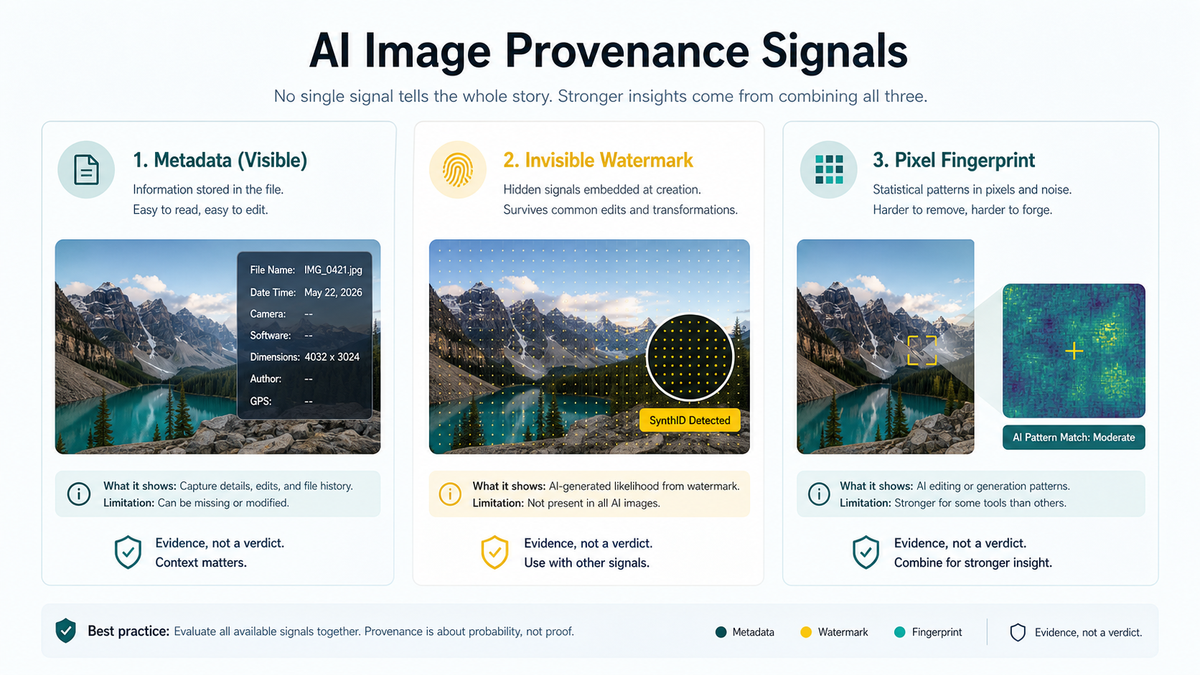
AI image detection is strongest when visual forensics, metadata checks, and provenance standards are used together.
No detector is perfect, so high-risk workflows should verify C2PA credentials, SynthID signals, source history, and image context.
Tool choice depends on the use case: newsroom review, marketplace moderation, education, brand safety, or casual checks.
EasyGlobe Team
Global Growth Team
EasyGlobe helps teams expand into global markets with practical SEO, localization, LLM optimization, paid advertising, and growth operations. We turn complex international growth work into clear systems, high-quality content, and measurable execution.
The best image authenticity workflow in 2026 is not a single probability score. It is a review workflow that combines provenance, watermarking, metadata, visual evidence, model signals, and human judgment. You can start with the EasyGlobe image checker for a first pass, then verify the image with source and context checks.
This guide is for content teams, editors, ecommerce operators, brand safety teams, and developers. It does not claim any detector can prove an image is real or fake by itself; it shows how to choose the right evidence stack for your risk level.
Reliable AI image detection is an evidence chain, not a single button.
What types of image detection tools should you compare?
The first group verifies provenance signals such as C2PA Content Credentials, OpenAI image provenance, and platform watermarks. The second group analyzes AI generation fingerprints in pixels, compression patterns, and model artifacts. The third group turns detection into a review workflow with logging, escalation, and reporting.
Free detection tools are practical for personal checks, editorial triage, and low-risk moderation. Their strength is speed and accessibility. Their weakness is that outputs are often hard to interpret, and the same image can receive different results after compression, screenshots, or editing.
The safest way to use free tools is as a screening queue. Check source and metadata first, compare more than one tool, then classify the result as low, medium, or high risk instead of real or fake.
When should teams use paid image authenticity APIs?
A paid API is valuable because it puts checks inside a repeatable process. Teams can run detection when users upload images, product photos enter review, newsrooms ingest visuals, or ads are submitted. The API can also preserve evidence, hashes, timestamps, and reviewer decisions.
For production use, prioritize APIs that support batch processing, explainable evidence, audit logs, and combined outputs for C2PA, SynthID, EXIF, and model scores. A tool that only returns one percentage is not enough for final enforcement.
Metadata, watermarks, and model signals answer different questions.
Why should C2PA and SynthID be checked separately?
C2PA is an open standard for media provenance and edit history. The C2PA explainer describes verification of manifests, signatures, and the chain of trust behind content credentials.
SynthID is an invisible watermarking approach. Google DeepMind explains that SynthID embeds imperceptible signals into AI-generated images so they can later be detected, even after some common edits.
What mistakes lead to false AI detection conclusions?
The first mistake is treating a detector score as a fact. The second is ignoring the file chain: screenshots, social compression, exports, and cropping can remove or damage detectable signals. The third is checking pixels without checking provenance.
Which image verification stack fits each use case?
For individuals: run a first-pass detector, inspect the source, look for earlier versions with reverse image search, and avoid public accusations based on one result.
For content teams: add detection to the asset intake process. For high-risk images, record source URL, uploader, tool results, reviewer, and final decision. News, health, finance, and politics should receive stricter review.
For developers and platforms: design the report as an evidence object with provenance credentials, metadata, file hash, model judgment, thresholds, and human review status.
FAQ
Can an AI image detector be 100% accurate?
No. Detectors provide provenance signals, watermark evidence, or model judgments. Real verification also needs source checks, timing, context, reverse image search, original files, and human review.
Are free AI image detectors enough?
They are often enough for personal triage, but not for team enforcement. If the result affects takedowns, account penalties, transactions, or publishing, use an auditable workflow.
What is the difference between C2PA and an AI image detector?
C2PA verifies content credentials and edit history. AI image detectors analyze whether image signals resemble generated media. They answer different questions and work best together.
This comparison is currently a feature, privacy, and workflow evaluation—not a completed laboratory leaderboard. EasyGlobe will not publish invented accuracy scores without a real dataset, complete raw results, and a reproducible test script.
Use at least 20 real images, 20 original AI-generated images, and 10 transformed AI images created through screenshots, cropping, resizing, or heavy recompression. Keep source families separated across evaluation groups.
Report real-image false-positive rate, original-AI recall, transformed-AI recall, inconclusive rate, and request-failure rate separately instead of one blended “accuracy” number.
Freeze thresholds and inconclusive rules before testing. Record tool version, test date, upload privacy, file limits, and API errors so criteria are not changed after seeing results.
Publish cohort sizes, a confusion matrix, raw outputs, and transformation steps. Compare watermark or provenance tools in a separate column from pixel classifiers.
How to use this comparison
Until a measured results table is published, read the current ordering as editorial feature navigation. Choose pixel detection, C2PA, SynthID, or deepfake review by task, then validate finalists on a small sample of your own content.
For a single-file check, use the EasyGlobe AI Image Detector and retain the original file plus output for human review.
2026 workflow comparison
How to choose among 7 AI image-verification workflows
No single detector covers pixel classification, deepfakes, SynthID, C2PA, metadata, and original-source verification at once. This table compares workflows and boundaries; it does not present an accuracy ranking without independent, like-for-like testing.
Capabilities below summarize each provider's official product page or help documentation; they do not imply that EasyGlobe has benchmarked every tool under identical conditions.
Comparison of seven AI image detection and provenance-verification workflows
Cross-checks pixel-based AI probability, deepfake signals, C2PA / Content Credentials provenance, and basic metadata in one upload.
No sign-up is required. The browser reads C2PA locally, then sends a resized, metadata-free WebP copy to the site API and Hive only when needed. A probability score is not forensic proof.
A fast, free multi-signal check before deciding whether a deeper investigation is needed.
Pixel-based generated-image scoring, plus deepfake and face-manipulation detection with API access.
A web demo and API are available. Its generated-image model explicitly ignores EXIF, C2PA, and invisible watermarks, so it cannot establish provenance by itself.
Media moderation that needs pixel detection, deepfake analysis, or a production API.
AI-generated content labels and confidence scores for images, video, and audio through structured API responses.
It is primarily an API and enterprise-integration workflow. A classifier score alone does not establish the creator, original source, or complete edit history.
Teams that need multi-format, high-volume content classification and moderation APIs.
Accepts a file upload or image URL and returns an AI-generated versus human-created classification; an API is also available.
The site accepts file uploads or image URLs and also offers an API. It warns that screenshots may reduce detection quality, and results do not verify C2PA.
Occasional single-image checks and users who want a workflow for reporting misclassifications.
Checks SynthID for content generated or edited by Google AI and reads Content Credentials when a compatible file includes them.
A signed-in personal or eligible Workspace account is required, and usage quotas apply. Gemini currently recognizes SynthID from Google AI content only.
Checking a file suspected to come from Gemini, Imagen, or another Google AI workflow.
Inspects C2PA Content Credentials and, when present, shows creator, tools, edit history, and disclosed generative-AI use.
This is a free web tool, and Adobe says content uploaded to Inspect is not stored. “No Content Credential” does not prove that an image is camera-authentic.
Verifying provenance, tools, and edit history for signed media.
Cross-check the file
Related AI image detection tools
Cross-check the same original file with different signals instead of using one probability score for a high-stakes decision.